Water.ini
The water colour and texture still come from StandingWaterColor, StandingWaterTexture and the
time of day DiffuseColor. On shader model 3 cards the texture gives only its average colour, and
ShaderWaterDeepColor can replace that. Tuned in the WaterTransparency block of Water.ini, and
per map in map.ini. WorldBuilder Qt edits a map's keys live under File > Map.ini > Water tuning.
Cheat builds reload Data\INI\Water.ini about half a second after it is saved, so the water can be
tuned with a map running. The saved values win over the map's map.ini until the map loads again.
A deleted key keeps its value until a restart, skybox textures need a restart, and a file with an
error is skipped until the next save.
Main keys
These set the look of most maps. The rest are under Advanced keys.
ShaderWaterOpacity = 0.95Opacity of deep water. 1 hides the seabed.ShaderWaterClarity = 1.0How deep the seabed shows. Higher sees deeper.ShaderWaterDeepColorColour of deep water, asR:0-255 G:0-255 B:0-255. Unset takes the average colour ofStandingWaterTexture. The map's light andDiffuseColorstill tint it. Shader model 3 only.ShaderWaterWaveScale = 160World units one wave pattern covers. Higher gives broader waves.ShaderWaterWaveStrength = 0.2Steepness of the waves. Drives glint, sparkles, reflection and bending.ShaderWaterSpecular = 1.0Brightness of the broad sun glint. 0 turns it off.ShaderWaterSparkle = 2.0Brightness of the small sun specks, times the map's light, sun and ambient together. 0 turns them off. The specks are a narrow highlight off the ripples, from a sun ahead of the camera, so they show from every view. More of them show asShaderWaterWaveStrengthrises. Shader model 3 only.ShaderWaterReflection = 3.0Scales the sky reflection. 0 turns it off.ShaderWaterSwellHeight = 3.0Height of the vertex waves that lift lakes and seas, in world units. 0 turns them off. Needs a shader model 3 card.ShaderWaterFoamStrength = 0.5Brightness of the foam. 1 is full white web, 0 turns foam off.ShaderWaterAutoMeasure = YesCalms water by its distance from shore, so ponds, harbours and rivers are calmer than open sea. See Open water.ShaderWaterEnclosedCalm = 1.0How much calmer enclosed water is, 0 to 1. At 1 it keeps 40% of the wave strength, half the broad waves and 20% of the swell.ShaderWaterZoomCompensation = YesKeeps the ripples and sun specks as they look up close at any zoom and camera pitch. Zoomed out, the ripples double in size each time a pixel covers twice the ground, so their detail never filters away, and the specks glint off a sun just below the view's own height. No keeps the ripples atShaderWaterWaveScaleand the specks off the map sun's height. Shader model 3 only.
Advanced keys
Depth and colour
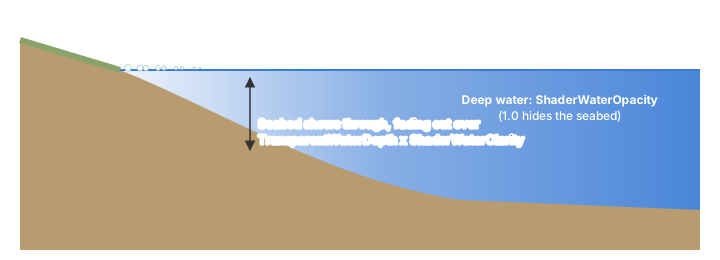
TransparentWaterDepth = 3.0Depth over which the seabed fades out, and over which the reflection, glint and foam fade in from the shoreline, so the water meets the ground without a line. 0 gives a hard shore edge.ShaderWaterClarityscales it. Same key as the old water.TransparentWaterMinOpacity = 1.0Opacity of deep water for the old water, and for shader water whenShaderWaterOpacityis 0.ShaderWaterTexturePattern = 0How much ofStandingWaterTexture's pattern shows over the water colour, 0 to 1. The pattern keepsShaderWaterDeepColoras its average. 1 with no deep colour set,ShaderWaterWaveShading = 0andShaderWaterSparkle = 0gives the shader model 2.0a look with the four wave layers. Shader model 3 only.ShaderWaterFoamDepth = 6Depth where shore foam fades out. 0 turns foam off, crest foam included. Pier walls, jetties and cliffs rising out of deep water gather foam within 15 world units.ShaderWaterShoreFoamDepth = 2.0Depth the shoreline foam band reaches at the top of its surge. Gentle shores show the band wider than steep ones. NeedsShorelineFoamin Options.ini. Shader model 3 only.ShaderWaterShoreFoamSurge = 0.4Share of the shoreline foam band the surge pulls back, 0 to 0.9. 0 holds the band still.
Surface
These keys control the glint and how far the waves bend the seabed. The inset in the swell picture below shows the ripple pattern.
ShaderWaterSpecularSpread = 1.0Widens the sun glint. The glint is the sun's reflection, so it only shows when the camera looks toward the sun, and most maps light from behind the default view. A wider glint catches more view angles and turns from a sharp sparkle into a broad sheen. RaiseShaderWaterSpecularwith it to keep the glint bright.ShaderWaterVirtualSun = NoYes glints off a sun placed ahead of the camera at the map sun's height, so the glint shows from every view. The glint then turns with the camera and no longer matches the direction of shadows and lighting. Only the glint moves.ShaderWaterRefraction = 0.015How far the waves bend the seabed, as a fraction of the screen.ShaderWaterWaveShading = 1.0How much the waves light and shade the water's own colour, so they show from straight above where the reflection is weak. 0 leaves the colour flat. Shader model 3 only.
On shader model 3 cards the waves come in four layers, from swells over two and a half ripple patterns wide down to chop a sixth of one, each drifting its own way.
Open water
Waves grow with the open water the wind crosses, so ponds lie glassy, harbours stay small and
choppy, and open sea rolls. With ShaderWaterAutoMeasure the game measures every map cell's
distance to dry ground and calms the water near shore by ShaderWaterEnclosedCalm. The other keys
set the open sea's look. Rivers count as enclosed. The distances are measured again when scripts
raise or lower water or the terrain changes. Shader model 3 only, and the distance reading needs
vertex texture support.
ShaderWaterOpenReach = 400World units from shore at which water counts as fully open. The enclosed look fades into the open look over this distance. Distances stop at 2550.
Tiling
The ripples and the foam repeat on a fixed grid, which shows as a pattern across a large lake or sea. Stochastic texturing hides it. The water is split into hex cells, each cell shifts and turns the patterns by its own random amount, and every point blends the three nearest cells while keeping the patterns' contrast. The waves travel the same way in every cell.
ShaderWaterStochasticSize = 420World units between neighbouring cells. Smaller breaks the pattern up more but blends more of the surface. 0 turns it off.ShaderWaterStochasticSeabed = YesThe same cells also shift and turn the terrain textures under standing water, fading in below the waterline overTransparentWaterDepth. Cliffs keep their own texturing, and ground under rivers is left as it is. Terrain chunks with standing water draw through their own shaders, which take three point lights instead of eight. No turns it off. The same tiling can be painted onto dry ground; see Stochastic terrain.
Animation
WaterAnimationFps = 30Moves the water as if the game ran at this rate, 30 to 60. 30 gives the original speed. 0 moves the water every frame, so it speeds up with the frame rate when the game logic is uncapped.
Swell
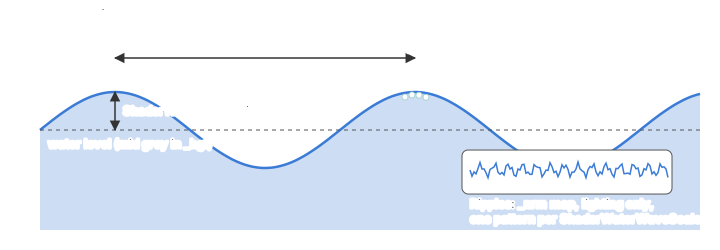
ShaderWaterSwellScale = 700World units one swell pattern covers. Higher gives longer swells.ShaderWaterSwellSpeed = 30World units a second the swell drifts. 0 holds it still.
The waves reach full height in water twice ShaderWaterSwellHeight deep and flatten towards the
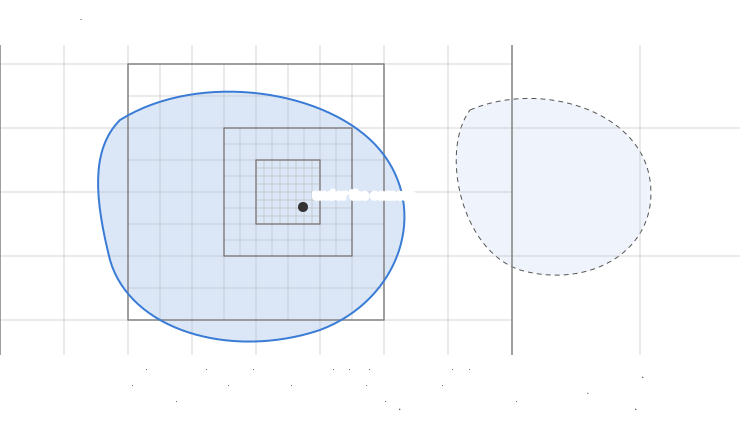
shore, so their troughs never sink below the seabed. The swell rides nested square grids centred
under the camera, each with cells twice the size of the one inside it, so it is fine close by and
coarser towards the horizon. Each grid snaps to its own world lattice, so moving the camera never
makes the waves shift or shimmer. The grids cover every flat lake and sea at a level, cut to their
outlines per map cell and one cell wider, so the cut falls on dry land and the shore fades as drawn.
Standing water whose points differ in height by more than a unit keeps its own grid, and rivers stay
flat.
Reflection
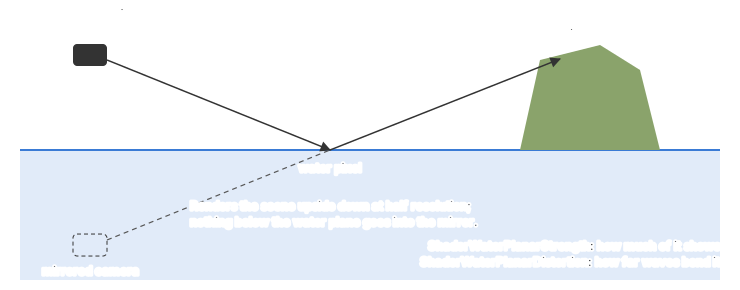
ShaderWaterClearReflections = YesUnit, building and cliff shadows leave the sky and mirrored scene in the water as bright as around them, as a shadow takes only the sun's light away. They still darken the water's own colour and hide the glint and specks. No dims the reflections in shadow too. Shader model 3 only.-
ShaderWaterSoftShadows = YesShadows in the water blur with depth, up to 4 world units, and sway with the ripples, as sunlight scatters through the water. No keeps them as sharp as on the ground. Shader model 3 only. -
ShaderWaterPlanarStrength = 0.3Reflection the mirrored scene adds on top of the sky's. 0 leaves the mirror only at grazing angles. Water at another height than the one under the view fades to the skybox over 4 world units. ShaderWaterPlanarDistortion = 0.02How far the waves bend the mirrored scene, as a fraction of the screen. It follows the wave slopes, soShaderWaterWaveStrengthand calmer enclosed water scale it too. 0 keeps the mirror sharp.
Retired keys
These keys still load but do nothing, as the water uses fixed values for them:
ShaderWaterShallowColor, ShaderWaterSparkleSize, ShaderWaterSparkleSpread,
ShaderWaterEnclosedWaves, ShaderWaterEnclosedWaveScale, ShaderWaterEnclosedSwell,
ShaderWaterEnclosedColor, ShaderWaterStochasticSharpness, ShaderWaterStochasticRandom,
ShaderWaterStochasticRotation, ShaderWaterFoamReach, ShaderWaterFoamScale and
ShaderWaterPlanarFade.